Required section · Section 2 of 6
Measurements feed a pattern
Classify a result by what the analyzer method card says it measures or calculates, not by its clinical importance. In this impedance example, RBC and platelet count are measured pulse counts; hemoglobin is measured by SLS photometry after lysis; hematocrit may be measured or derived depending on the configured method; MCV, MCH, and MCHC are calculated from stated inputs. A method card is a teaching aid that summarizes an analyzer family; it is not the instrument instructions for use (IFU), a local validation record, or a release rule.
Keep four concepts separate: a method definition explains the signal; a reported-result definition specifies calculation and units; review status means flags, limits, or criteria that trigger local review; calibration and quality status document whether the instrument system is acceptable for use. A result can be measured and still need review, and a correctly calculated index is not proof of calibration or patient-result validity.
Use declared inputs and units before calculating. MCV (fL) = hematocrit (%) ÷ RBC (× 10^12/L) × 10; MCH (pg) = hemoglobin (g/dL) ÷ RBC × 10; MCHC (g/dL) = hemoglobin ÷ hematocrit × 100. Plateletcrit (%) = platelet count (× 10^9/L) × MPV (fL) ÷ 10,000 when that is the local analyzer definition.
Illustrative drawing — this picture was drawn rather than captured.
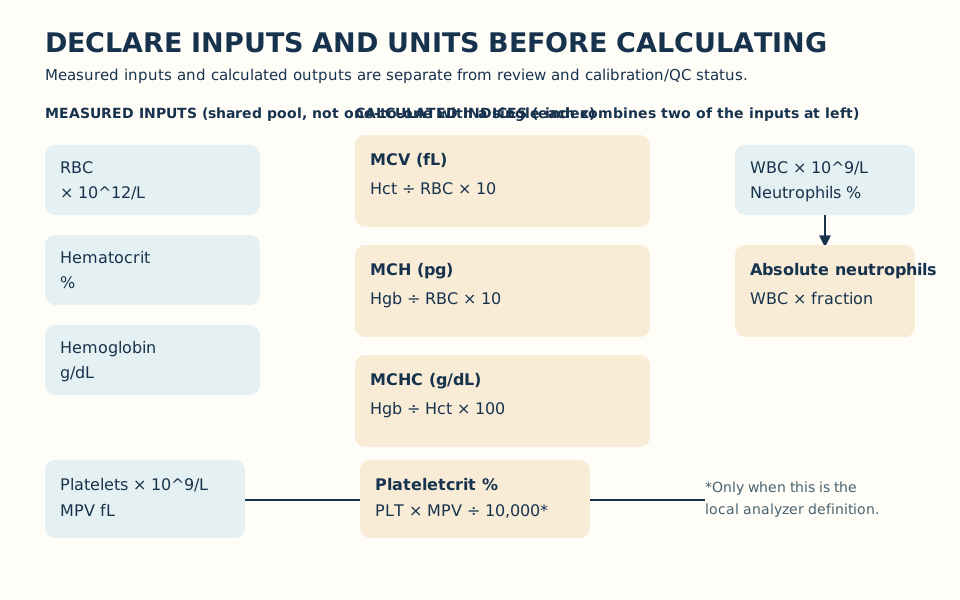
Identify the result definition and required inputs before comparing a relationship; then use local review criteria.
Declare the method and status
Read the analyzer family/IFU and distinguish measured, calculated, review, and calibration/QC status.
Check inputs and units
Confirm RBC, hemoglobin, hematocrit, WBC, differential percentage, platelet count, and MPV units before calculation.
Calculate or compare
Use the stated formula and local rounding only as a consistency screen.
Choose bounded review
Investigate specimen, analytic, or clinical-change evidence under local policy before release.
Knowledge checks
Reading and checks are open. Sign in only to save.
Knowledge check 1
Section status
Finish this section
Reading and checks are open. Sign in only to save.
The module finishes after every required section is marked done and every check in those sections is correct.